For building muscle
Your sets are getting buried in notes.
Capture them naturally, revisit the previous session, and use goal context to decide what to focus on next.
Write or speak your workout in your own words. RUNE organizes the details, keeps the original context, and turns your history into something you can use for the next session.
Web app available · Current app interface is Japanese · AI availability depends on your setup
 RUNEA record you can build on.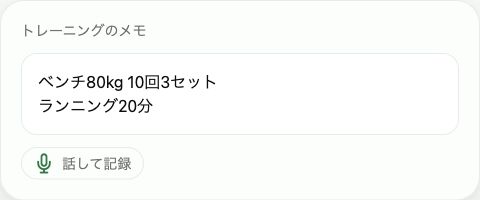
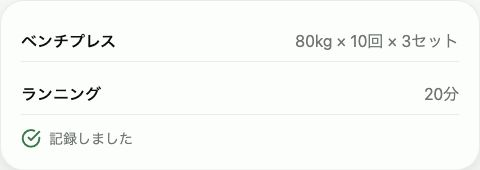
Rendered from the actual app’s UI components
Illustrative numbers. Actual UI is currently Japanese.
Choose an exercise. Enter a weight. Enter the reps. Add another set. Forms work well for some people. If you already think in notes, RUNE offers a different starting point.
Bench 80 kg, 10 reps, 3 sets.
Note → organize → review and save
Capture the workout as it happened, without deciding every field first.
Free text holds context. Structured records make comparison possible. RUNE keeps both.
A lifting session and a run belong in your history, even when they need different metrics.
RUNE connects recording with reflection. You stay in control of what is saved: the parsed result is a draft you can review and correct.
Keep the weights, reps, time, and details in the order that makes sense to you. On supported browsers, speech becomes text you can check before saving.
This website demonstrates fixed examples checked against the app’s reading code. Live AI parsing and speech recognition happen in the app. Speech support varies by device and browser.
ベンチ80kg 10回3セット
The result stays a draft until you review it. Correct anything that doesn’t match your intention.
A tough last set or a change in how you felt remains part of the original note.
A useful history needs more than text. RUNE separates the measurable details without treating every discipline like a set of weights and reps.
Strength sets, distance and duration, workout formats and results, and practice observations each have their own representation.
Missing numbers aren’t silently filled in. Ranges and ambiguous details remain subject to review.
The app calculates facts from the record. AI helps interpret them, and its output is checked.
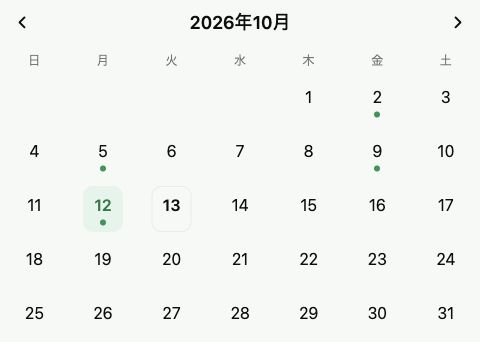
Choose a date in the calendar and open the session. Revisit the sets, condition, original note, and feedback together.
Recorded days are marked. Unconfirmed entries have a distinct appearance.
Reopen the review to edit a session, or delete an entry you no longer need.
Changes are grounded in your saved training, giving you a reference for the next session.
More reps at the same load. A new best. A different weekly rhythm. A longer history gives you more to reflect on than a single session can.
RX and scaled workouts, or outdoor and treadmill runs, aren’t treated as interchangeable performances.
Previous-session changes, best records, frequency, and plateau patterns are grounded in history.
Next and Ask connect the record with your goals and help you consider what to keep doing or revisit.
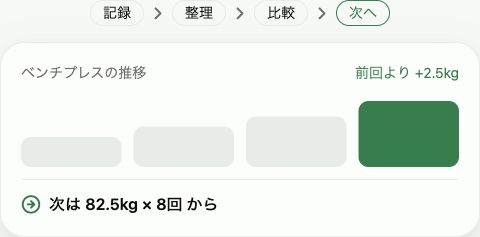
Home stays focused on recording. After saving, feedback puts the session in context. Ask lets you explore your history when you want an answer.
Ask about recent bench progress or a comparable workout in your own words.
Relevant records and important numbers accompany the response.
Connected capabilities vary by device and provider. Not every AI feature is available in every environment.
Review comparable load, reps, and recent history. A plateau’s cause is not diagnosed from missing evidence.
Questions and analysis scope, not fabricated AI answers.Use Next to revisit your goals, recent history, and benchmark records. The previous workout becomes a reference for what to focus on today.
Review previous loads, reps, and recent patterns.
See the current record alongside a goal you have set.
Numeric suggestions depend on available history and context, such as reported effort. Missing evidence isn’t replaced with a guess.
Different training calls for different measures. RUNE has discipline-specific reading and data models, with one place to keep the history.
kg / reps / sets
Different training, different measures.Loads, reps, sets, and changes under comparable conditions.
Distance, time, pace, and recorded environmental context.
Rounds, time, workout structure, and station details.
Time, movements, sides, and self-reported observations.
The same load can feel different after a poor night’s sleep. Keep fatigue, effort, sleep, and free-form context alongside the training.
Capture what matters that day. There is no need to complete every field.
Record RPE, RIR, or a note about how it felt.
Changes in mobility or comfort are kept as reported observations, not medical assessments.
“Five hours of sleep. A little tired today. Last set RPE 9.”
Bring dated notes and supported files into RUNE, organize them by day, and review the results before saving.
Paste dated training text. Ambiguous details are gathered for review.
File adapters read tables into an importable form. Support for another app’s export depends on its format.
The app has a dedicated restore path for its own export format.
Attaching a photo to a live record is different from bulk history import. Bulk screenshot migration isn’t advertised as available.
RUNE is building around intelligence you can choose. Device AI and personal API connection foundations exist; consumer-account connections depend on provider rules and RUNE support.
This does not mean every existing AI subscription can be reused, or that every source is free.
The app checks whether a source such as Chrome’s built-in AI is actually available on your device.
Native foundations exist, but release availability and compatible devices still need confirmation.
A generally available connection that continuously exposes your history to ChatGPT or another assistant is not promised today. Provider approval and permissions are prerequisites.
Your record should remain useful beyond one screen. Settings includes CSV and JSON export paths for your own training data.
Export a flat format for spreadsheets and other analysis.
The export implementation includes original notes, confirmed records, goals, and related history.
Editing, session deletion, and account deletion flows exist. Unverified retention or third-party sharing policies aren’t asserted here.
Keep your history useful, in and beyond RUNE.
These are use scenarios, not testimonials or measured user outcomes.
Your sets are getting buried in notes.
Capture them naturally, revisit the previous session, and use goal context to decide what to focus on next.
Your records live in separate places.
Keep strength sets and run distance and time together, then reflect on your overall rhythm.
A faster time may come from a different prescription.
Retain workout and RX/scaled conditions so the comparison has meaning.
You want to remember more than minutes.
Keep movements, sides, and your own observations alongside time.
Re-entering years of training sounds exhausting.
Import supported files or dated notes, review them, and keep building from that history.
Lower-friction recording matters from day one. As history grows, comparison, goal context, and informed questions become reasons to keep using it.
Plans are coming soon. These are layers of value, not announced free and paid tiers. Pricing and feature limits are unconfirmed. Your chosen AI or personal API may have separate costs.
Natural input, review, a calendar, and access to past sessions. The basics of a sustainable journal.
Comparable progress, plateau reflection, goals, and history-aware Ask. More ways to use the work you have already logged.
Pricing and feature tiers will be announced when confirmed.
Current implementation, practical limits, and what is still unconfirmed.
An AI training journal that organizes your notes into history you can compare and ask questions about. The app calculates facts; AI supports interpretation.
No. Reading code exists for running, CrossFit, HYROX, yoga, Pilates, and more. That doesn’t guarantee recognition of every workout or phrasing.
Yes. Japanese notation and natural-language handling exist. The current app interface is primarily Japanese; an English website doesn’t imply a fully localized app.
On supported devices and browsers, it uses platform speech recognition. Check the resulting text before saving.
Import implementations exist for dated text, CSV, TSV, XLSX, and JSON. Formats may need review and correction. Universal lossless migration is not guaranteed.
Record organization, post-session feedback, and history-aware questions. Capabilities depend on your selected AI and environment.
Settings has CSV and JSON export implementations. JSON retains original notes and related history.
Official pricing and tiers are unconfirmed. No temporary prices or assumed limits are advertised. Provider and personal API charges follow their own terms.
The web app is available. Mobile browsers can access it, with device-dependent voice and AI support. Native release dates and distribution are unconfirmed.
Authentication and per-user data access controls are implemented, alongside export, edit, and deletion flows. AI data handling depends on the connection method. Formal retention and sharing policies still need confirmation.
Write it. Check it. Learn from it. Open the web app and try keeping your own training in RUNE.
Try RUNEWeb app available · Current app interface is Japanese · AI availability depends on your setup